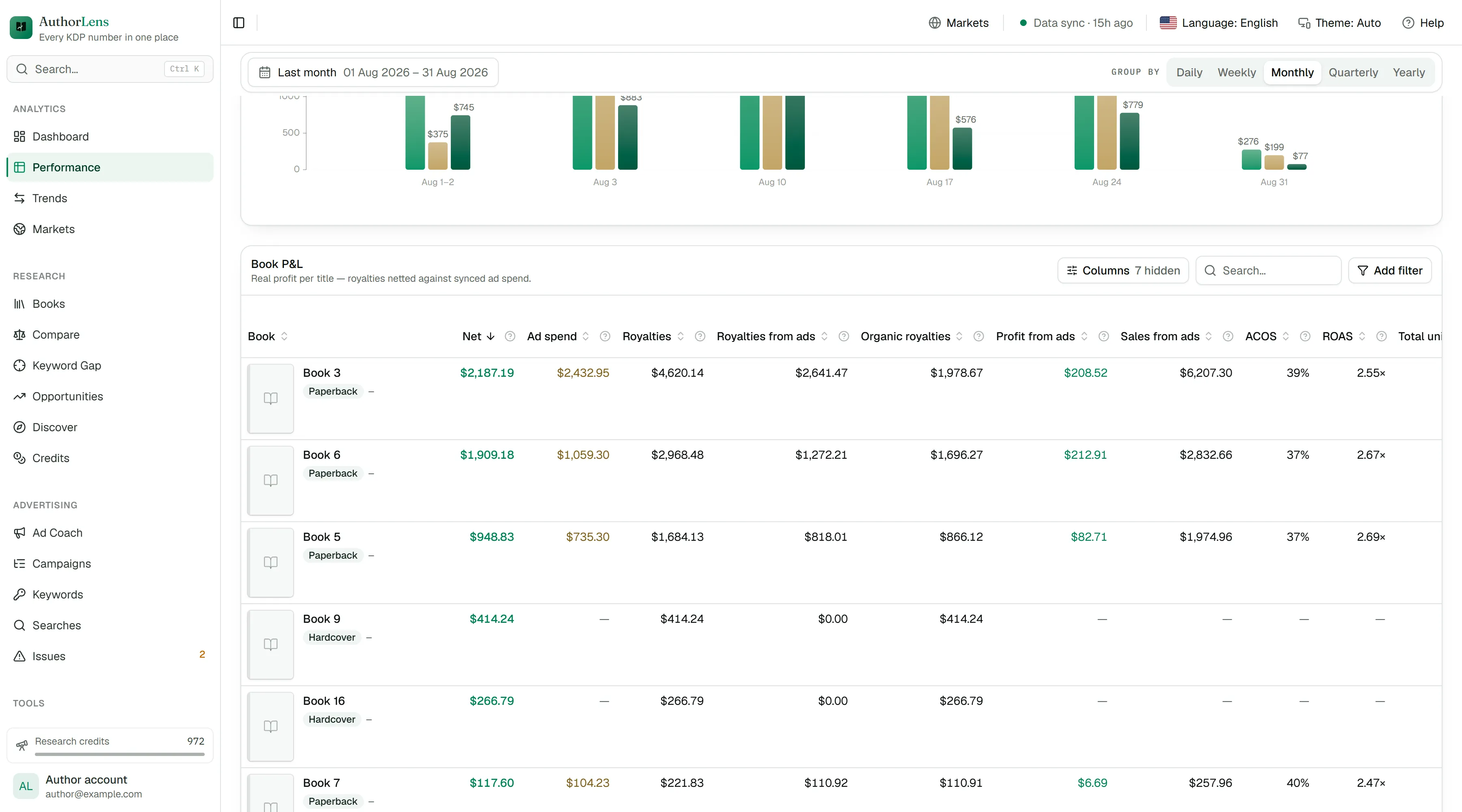
Net royalties per book
Royalties minus ad spend. The one number the whole business comes down to — and it is worked out book by book, not across the account as a whole.
AuthorLens — every KDP number in one place
Amazon’s console shows what happened. AuthorLens tells you what to do tomorrow — and what it will earn you back.
One analytics platform for Amazon KDP: ad and organic orders, campaigns, keywords, search terms, competitors, ratings, reviews and clear optimisation advice.
Your whole publishing business, on one screen.
7 days for $1, then $39.99 a month · set-up takes a few minutes · royalties through the browser extension · cancel anytime
How AuthorLens connects, and why it is safeSee what is working. Find what is wasting money. Know what to do next.
An example month from a made-up author’s catalogue — the real screens are below.
Inside AuthorLens
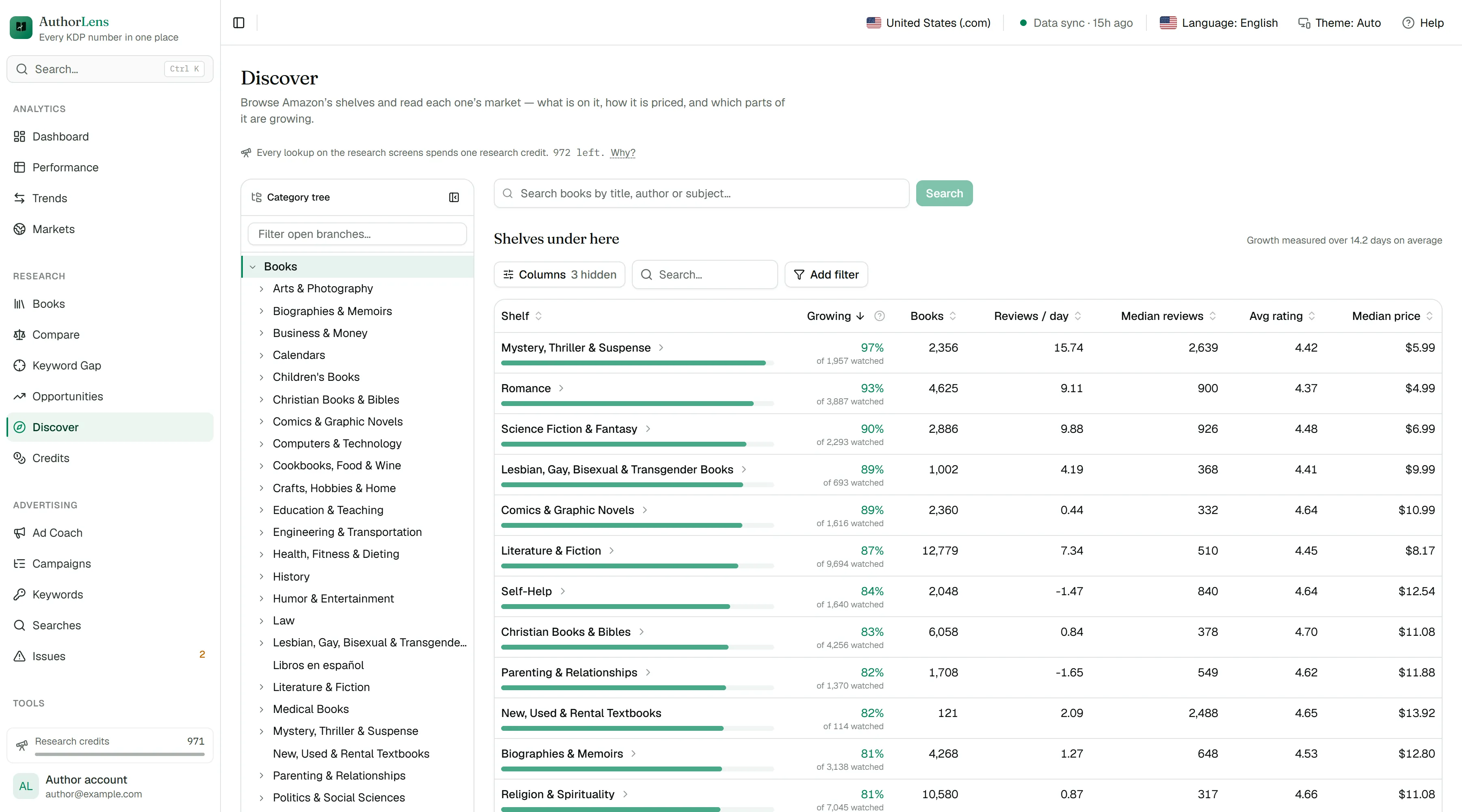
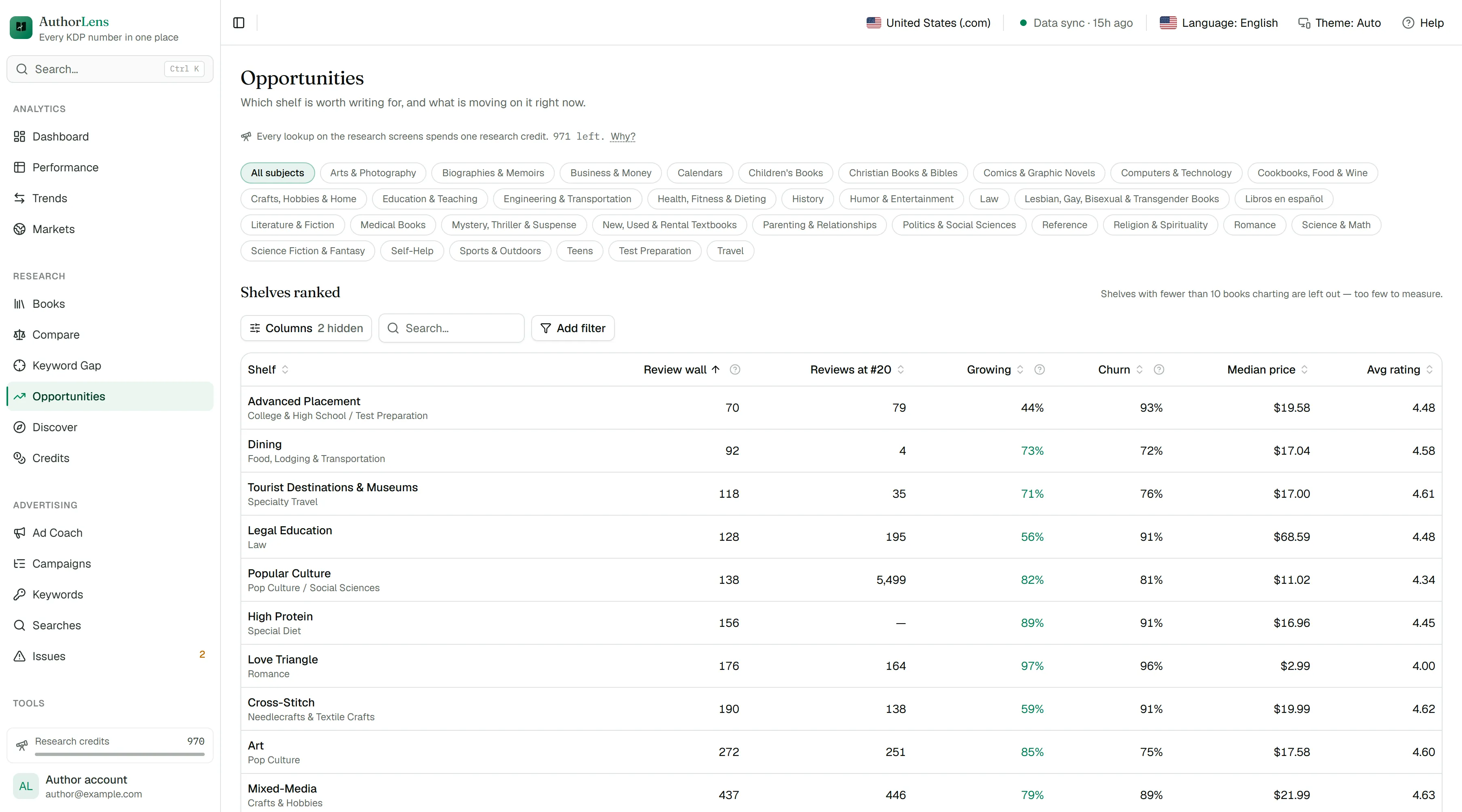
Every marketplace netted into one profit number. Every campaign measured against the break-even you actually earn. Every keyword shown with what it wasted. These are the real screens, on a real account.
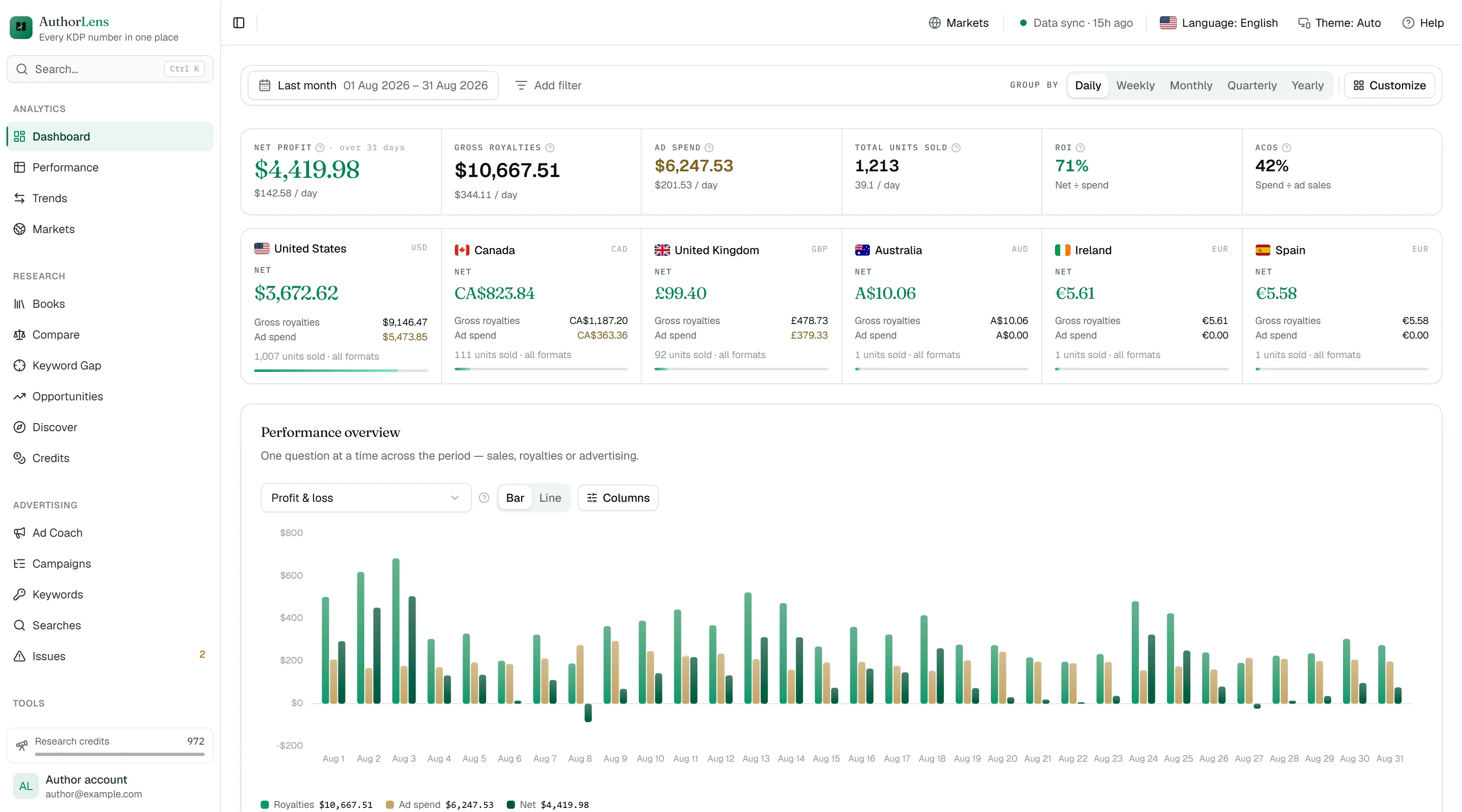
Drag the screenshot sideways to see all of it →
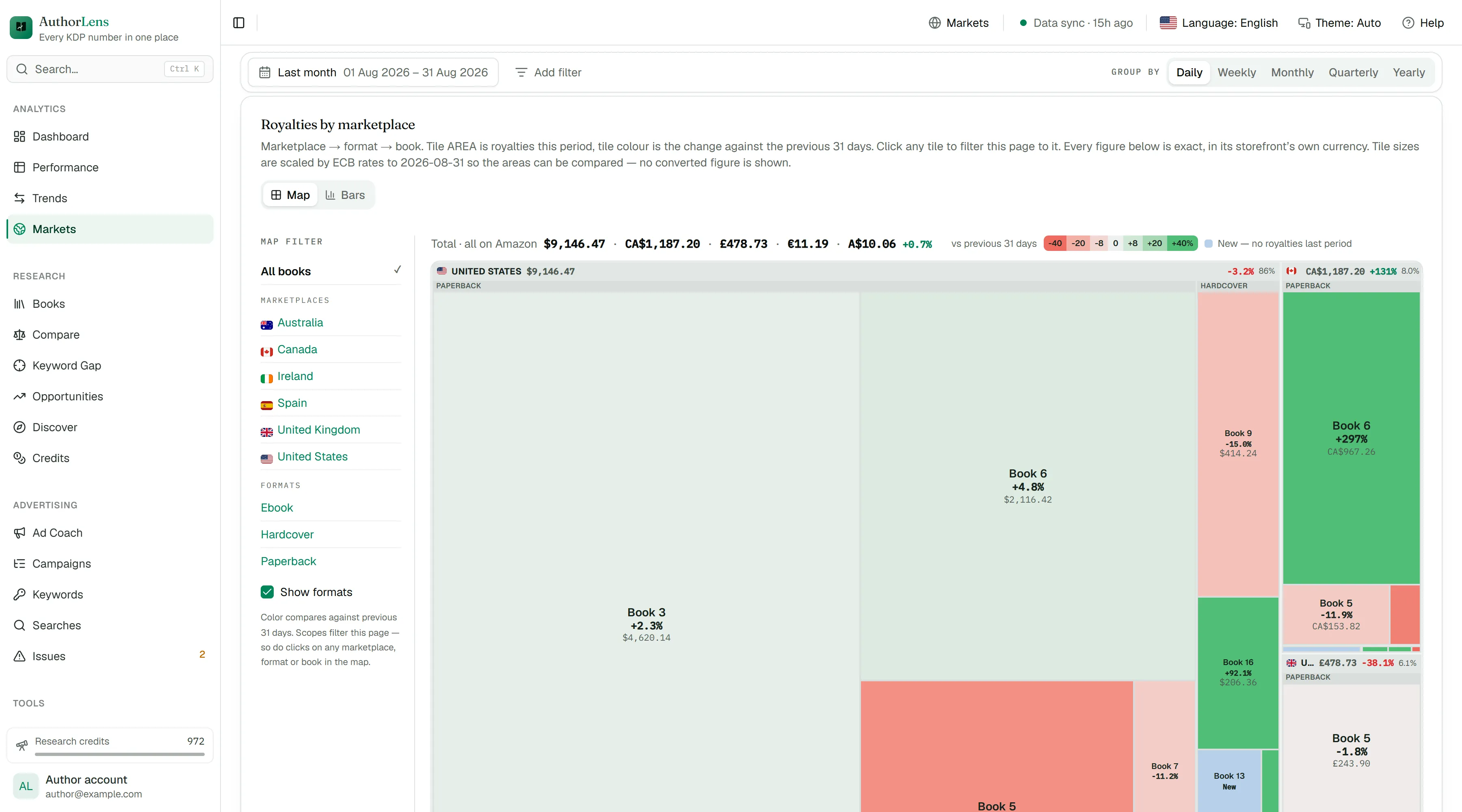
Net profit for the whole catalogue, split by marketplace and shown in each storefront’s own currency. United States alone: $137,677.92 in royalties, $24,316.77 of ad spend, $113,361.15 kept — with the UK, Canada and Germany each counted in their own currency beside it.
A real AuthorLens account, captured 10 September 2026 — August 2026 end to end. Every figure is genuine; the titles, authors, covers, keywords and search terms are replaced with placeholders so the publisher's catalogue stays private.
What it replaces
Both do one part of the job well: they show you what readers are searching for. But the second question — how much this particular book kept after advertising — neither answers, before launch or a year later.
It does not count your sales at all — neither paid nor organic. Royalties, spend and what the book kept after launch stay outside it.
It does not read KDP royalties or KENP reads — and without those there is no net profit per book, no organic sales, and no answer on which campaigns to fix.
Keywords, niches and competitors — everything they give you. Plus what neither of them has:
It does not work with physical products: this is a tool for books on Amazon KDP only.
How AuthorLens estimates another book’s sales and royalties
Comparison based on publicly available information as of August 2026. Publisher Rocket and Helium 10 are trademarks of their respective owners; AuthorLens is not affiliated with either.
Inside
Royalties minus ad spend. The one number the whole business comes down to — and it is worked out book by book, not across the account as a whole.
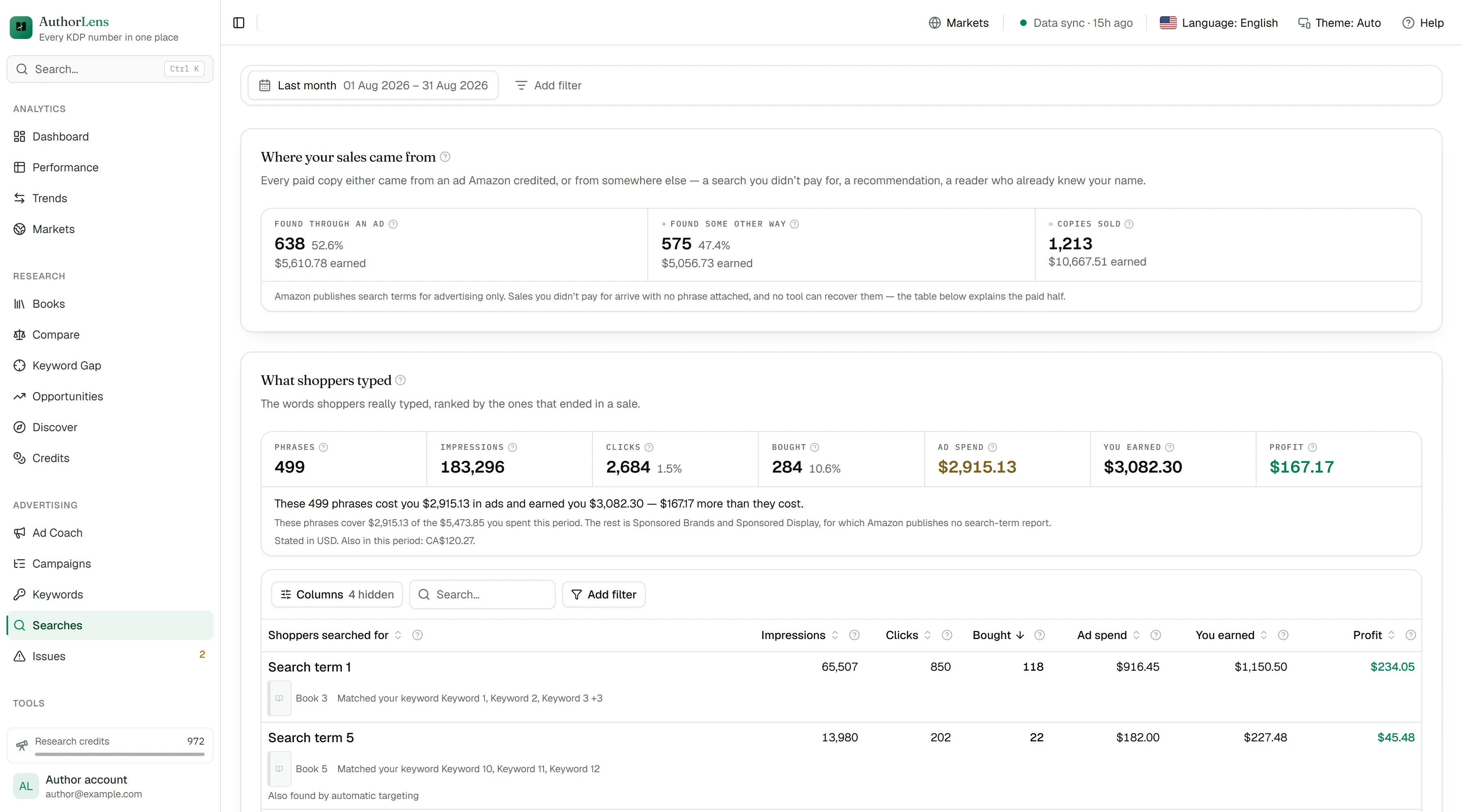
See how many sales advertising brought and how many arrived on their own. You did not pay for the second kind — and they are exactly why ACOS always looks worse than the business actually is.
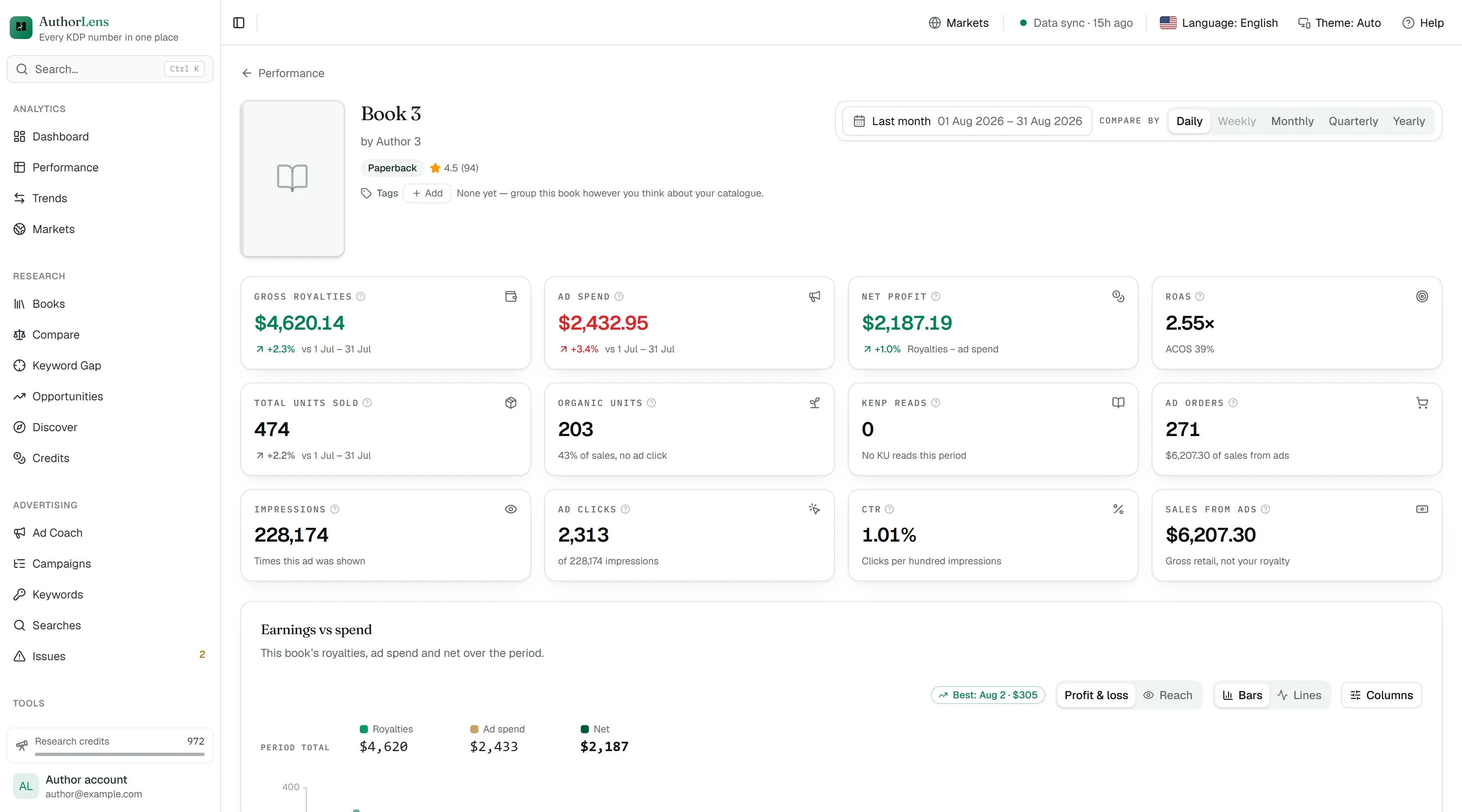
Not per account and not per campaign, but for one specific title: which to put more into and which to stop.
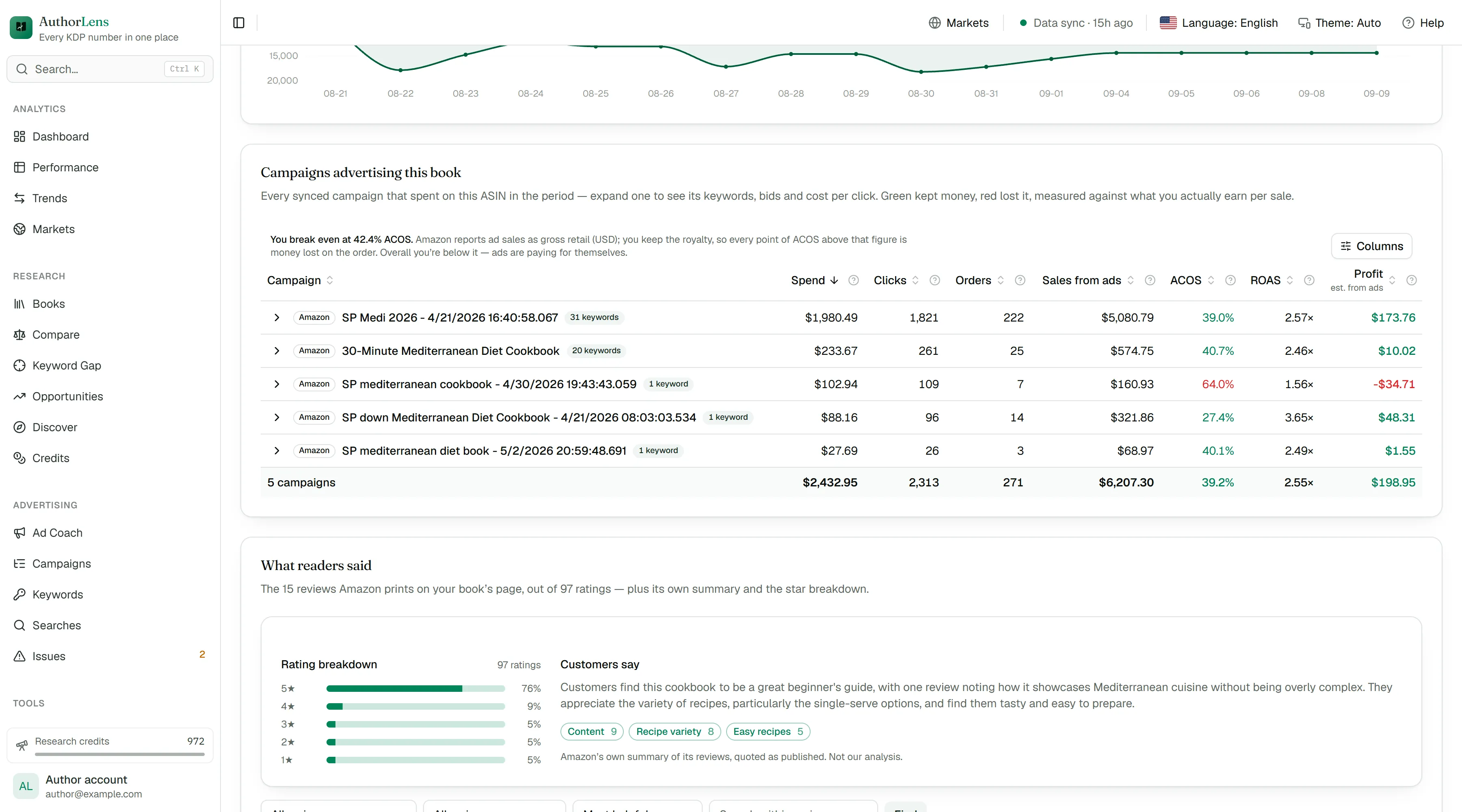
Which ones bring orders and which only spend the budget. Clicks, spend, orders and conversion for every term separately, not averaged across the campaign.
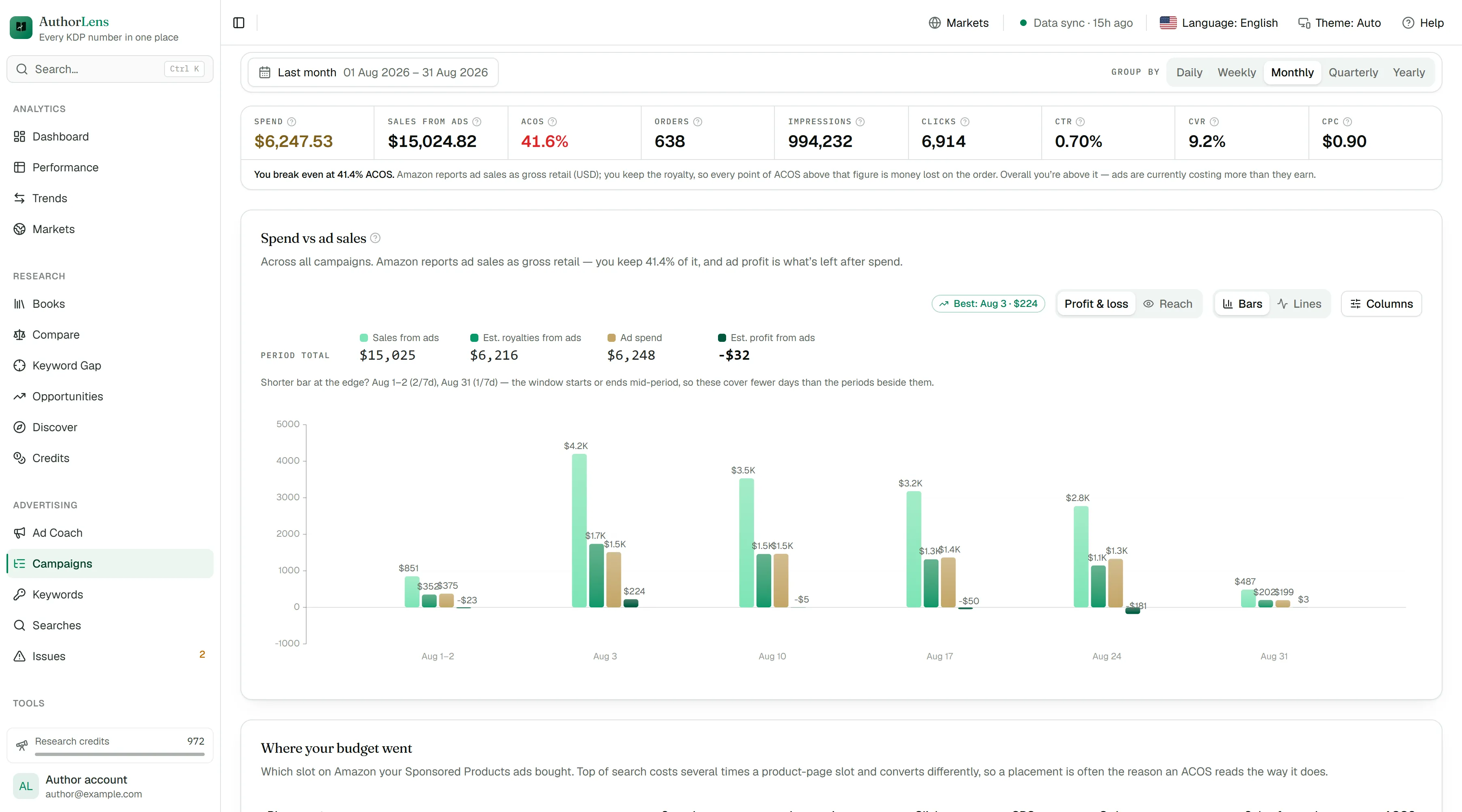
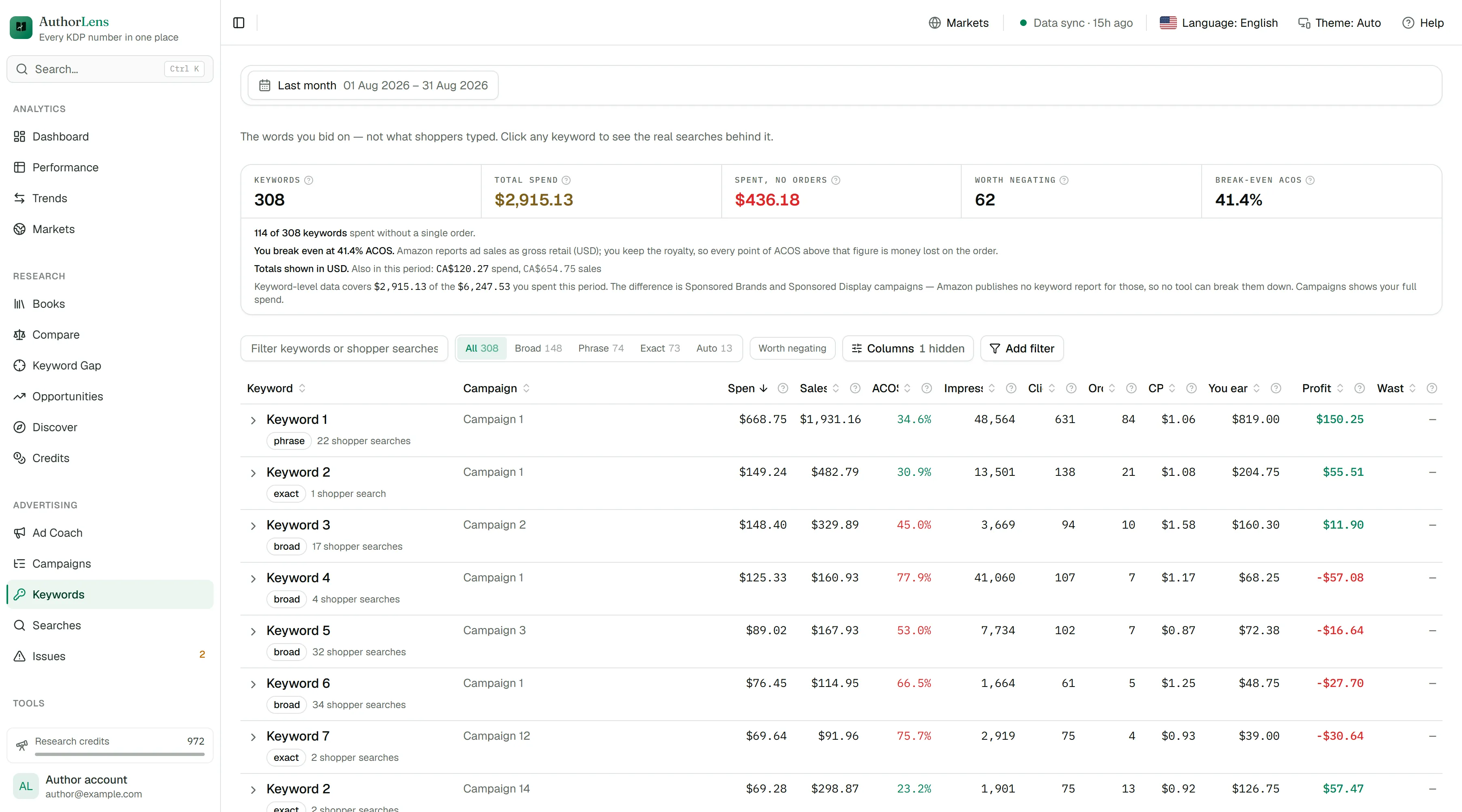
Everything the ad console holds, in one table: impressions, clicks, CTR, CPC, bids, orders, spend, conversion and ACOS — by campaign, ad group and target. You can see what is dragging you down and what deserves more budget.
A video or brand campaign can feature several books at once, so Amazon never says which one earned the sale. That spend gets its own line instead of being guessed onto a title — it still counts in your totals, and you can see exactly how much it is.
Any chart and any table can be configured: pick the metrics you care about, drop the columns you don’t, change the period and the breakdown. This applies across the whole product, not to one screen — and your choices are saved.
How many copies each format sold and how much each one brought. No opening three reports to work out what is actually holding the book up.
Amazon’s whole category tree: which niches are growing, what a book there costs and how many reviews it takes to compete. This is the research you used to buy a separate tool for.
All search terms sit in a single list, and the ones spending without a single order are obvious. The “Find negatives with AI” button checks every term and flags the ones that are not about your book. Copy the list and paste it into Amazon Ads.
Up to 500 keywords a day — where the book ranks organically and in ads. The “every keyword, every day” table shows how the book moves, what each keyword cost and how many orders it brought. “Road to #1” tells you how many sales a day it takes to keep pace with the leader.
Every morning in Telegram — what your books earned yesterday and what went on ads. Plus a weekly report, keyword rankings, and alerts when a day’s ad spend passes your limit, when profit drops, and when Amazon stops a book or an ad. Up to three recipients.
A Change column right in the table: every book shows at a glance whether it rose or fell against the previous period.
Words shoppers already buy your book through in ads, but that are nowhere in its title, subtitle or description. Add them — no new bids, no tests.
On every sync AuthorLens checks whether Amazon has blocked a book and whether your campaigns are actually being shown.
What is happening to the books sitting next to yours in the results — their price, rating, review count and how their rank moves.
Connect your own Claude or ChatGPT — it runs on your subscription, no extra OpenAI bill.
Ask in plain words — which book was the most profitable in August, where you are burning budget, what to research next. It answers from your own figures, never from a general opinion about publishing: every number it quotes was computed before the model saw it. Connect AuthorLens to the Claude or ChatGPT you already pay for with one link and one click on Allow: it reads the same numbers your dashboard shows and can look up the Amazon market for you, but it never touches your Amazon account. The connection needs a paid Claude or ChatGPT plan.
Getting started
An email and a password — that is the whole form. We send one link to confirm the address.
The advertising console connects through Amazon’s official API; royalties come through the AuthorLens extension for Chrome or Firefox, because KDP has no earnings API of its own. Neither ever changes anything in your Amazon account, and together they take a few minutes.
After that you simply open the dashboard. Nothing to reconcile by hand.
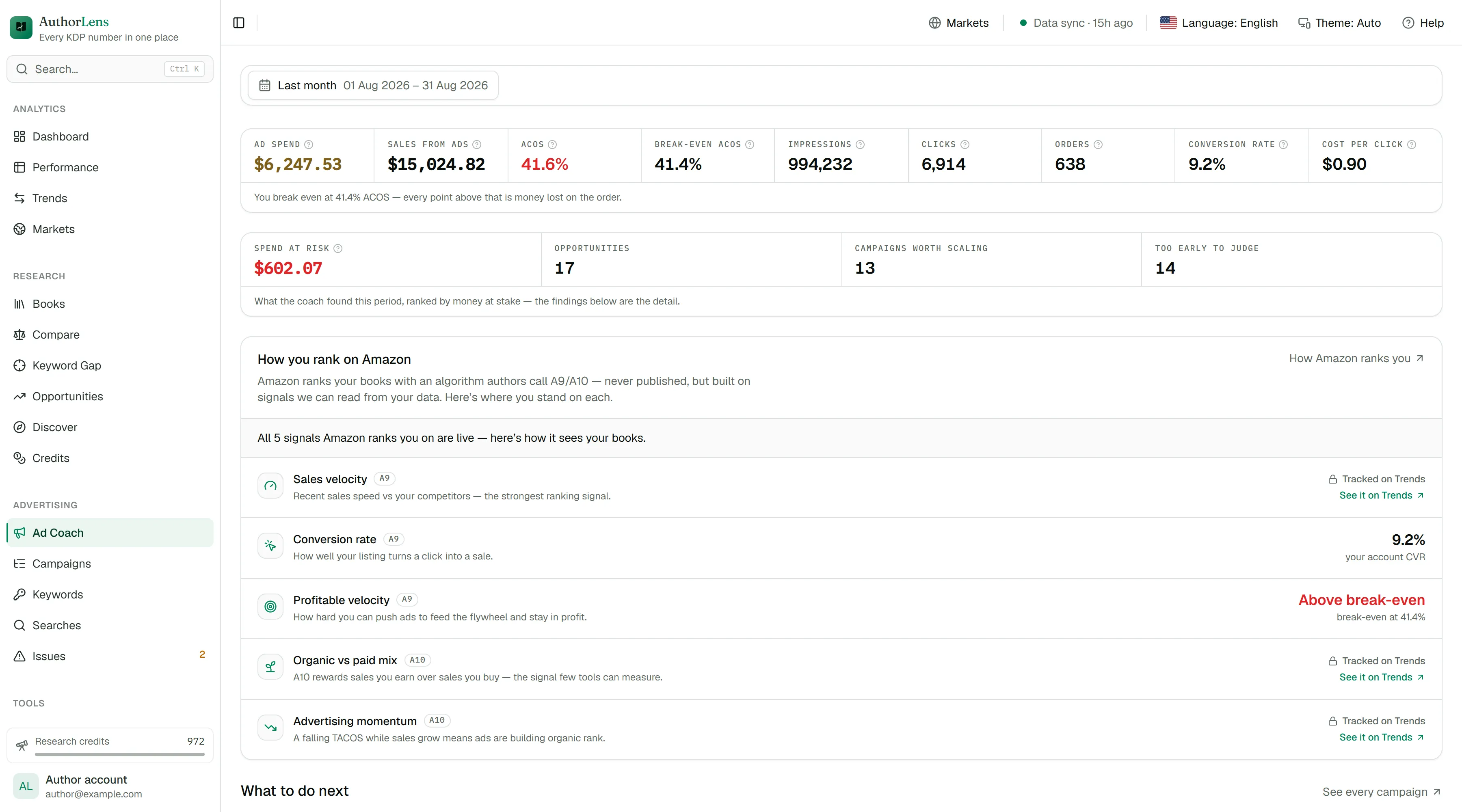
Ad CoachNew
In our own campaigns AuthorLens found 39 fixes — about +$355 a month (AuthorLens’s estimate). Every suggestion comes with the exact bid, a dollar amount and the time it takes: “a minute” or “a bigger job”. The subscription costs $39.99.
There are 39 things worth doing — stopping the spend that is losing money is worth about $355.45 a month. 17 of them take about a minute each.
The amounts are the app’s estimate, not a promise of earnings. The decision is always yours: AuthorLens never changes anything in your account.
Straight answers
AuthorLens only reads your reports. It never places a bid, changes a budget or touches a price. Amazon’s permission screen mentions campaign access because that is the only advertising permission Amazon offers — we use it to read, and for nothing else.
Nothing is smoothed or invented. If a figure is missing, Amazon has not sent it yet — reports arrive with a delay, and the screen says so instead of drawing a zero.
From inside your account, in Settings. No calls, no retention offers, no minimum term.
From authors
Real messages from our Telegram. The original is one tap away.
“I used to run my own Google Sheets, pulling data out of Amazon Ad Reports with formulas and scripts — and I still had to import the reports by hand every time. With AuthorLens I don’t want to go back to my spreadsheets. Besides the great statistics, together with the support team we added a few features I needed from Helium, plus some of my own wishes.”
 AnastasiiaKDP author · almost a month with AuthorLens
“I’ve been using it for a couple of days and I already see loads of features. I especially like that organic rankings are tracked automatically rather than by hand, so I can follow how they move. A great feature: advice for a specific campaign. Thank you to the team for building it, and especially for the Ukrainian interface!”
 YuliiaKDP author · first days with AuthorLens
“We use AuthorLens ourselves every day. I open one screen and I can see straight away which book really earns after ads, where the keyword rankings hold, and what to adjust in the campaigns. Ad Coach found 39 fixes in our campaigns — about $355 a month. I’m genuinely delighted with this app. Every new feature is tested on our own accounts first, and only then added for you.”
 Daria NeskoromnaAmazon KDP author, creator of the Book Business KDP course · co-owner of AuthorLens
“AuthorLens is two tools in one: a distilled ad course and a personal consultation based on the real numbers from my Amazon Ads account. It's intuitive, and the analytics show exactly what to change in my campaigns. The team is exceptional: I requested a placement breakdown for Sponsored Brands video ads, and it was released the same day. Connected to Claude, it feels like switching to a sports car. Not cheap at first glance, but no other paid tool has given me this much value. With several books or marketplaces, it's a must-have. Liudmyla, independent KDP publisher”
Pricing
Your first 7 days cost $1. Then $39.99 a month, or $395.88 a year on Yearly, charged to the same card. Cancel before then and nothing more is charged. The first week includes 50 research credits; the full 200 a month start with your first full payment.
Before you start
Connect Amazon and look at the real numbers.